Microcontroller: ATmega328P
- 8-bit AVRmicrocontroller
- 16 MHz clock speed
- 1 KB EEPROM
- 32 KB of flash memory (with 2 KB used by the bootloader)
- 2 KB SRAM
Input/Output Pins
14 digital I/O pins (only 6 are PWM outputs)
8 analog input pins (10-bit resolution)
6 PWM outputs (via digital pins)
1 reset pin
Power Supply:
It Can be Powered Via USB (5V) or through an external adapter (7-12V).
It Can Also be Powered with voltage regulator to provide 5V to the board.
Power LED to indicate operation.
Communication:
USB-to-Serial Communication: It can be connected to a computer via USB for programming and serial communication.
UART (Universal Asynchronous Receiver/Transmitter): It supports UART communication, which is useful for debugging or interfacing with other devices.
I2C and SPI: Supported for communication with other devices like sensors, displays, or other microcontrollers.
Programming Interface:
The board can be programmed using the Arduino IDE via the USB connection.
It uses the Arduino bootloader, which simplifies uploading sketches (programs) to the board.
Size:
Small form factor: The Nano is only 18 x 45 mm (1.8 cm x 4.5 cm), making it ideal for space-constrained Arduino Nano projects.
Breadboard-friendly: It comes in a 1.0mm pitch through-hole package, so it can be directly inserted into breadboards.
Onboard LEDs:
The Nano has an onboard power LED and built-in LED on pin 13, which can be used for testing and debugging.
External Connections:
The board has a mini-USB connector for power and programming.
It also has VCC, GND, and Reset pins, which can be used for other connections.
Common Applications:
Prototyping and DIY Arduino Nano Projects: Its small size and versatility make it perfect for hobbyists and makers building custom electronics projects.
Robotics: Due to its small form and digital/analog I/O pins, the Nano is often used in robotic control systems.
Sensors and Actuators: Used in combination with sensors, displays, or other components to build interactive systems.
Wearable Electronics: Its compact size makes it ideal for wearable projects like smart clothing or health monitors.
Comparison with Other Arduino Boards:
Arduino Nano vs Arduino Uno: The Nano is smaller and lacks the onboard USB-to-Serial chip, relying on a mini-USB connection instead. While the Uno is larger and has more pins, the Nano is much more compact and more suitable for smaller projects.
Advantages:
Compact Size: Ideal for tight spaces.
Low Power Consumption: Good for battery-powered projects.
Wide Community Support: The Arduino ecosystem, with tons of tutorials and libraries, makes it easy for beginners.
Limitations:
Fewer Pins: If you need more I/O pins, the Uno might be more suitable.
No Onboard Programmer: Unlike the Uno, you need an external USB-to-serial adapter to program the Nano on certain models.
In short, the Arduino Nano is a great choice for compact, portable projects with its small form factor and ample I/O capabilities, making it a versatile option for makers and hobbyists.
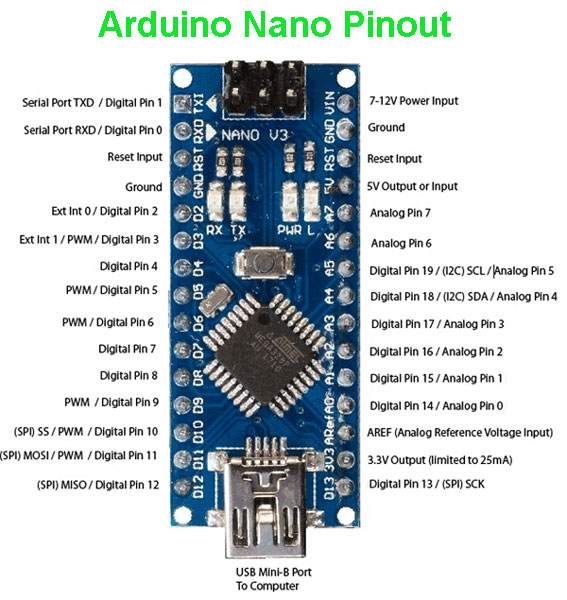
Arduino Nano Pinout Diagram